
Maybe it’s the trumpet from your high school band, out of its case after twenty years. Maybe it’s brand new and still smells of valve oil. Either way, the fingerings come quickly, because there are only three valves. The tricky part: the same fingering can give you several notes, and your lips and your air decide which one sounds. So when you practice alone, the most useful thing an app can do is show you which note you actually played. If you’d rather learn from a player’s videos, play along with a band or have a teacher watch you, there’s a good route for that too.
Three things that matter on the trumpet
Does it catch the wrong note? Press no valves and aim for a G, and the C below or above it may come out instead. A fingering chart can’t tell the difference, but an app that works through the microphone can. tonestro, MakeMusic Cloud and Metronaut mark right and wrong notes as you play.
Is the music written for your trumpet? Most players start on a B♭ trumpet, where a written C sounds as a B♭. Some play a C trumpet. Choose an app with music for yours: tonestro teaches the B♭ trumpet, Tomplay has music for trumpet in B♭ and in C, and Metronaut lists trumpet in B♭, C and E♭. Not sure which one you have? Here’s how the types of trumpets differ.
Where does the screen go? Both hands are on the trumpet, so your phone or tablet sits on the music stand. tonestro and Metronaut run on iPhone, iPad and Android. MakeMusic Cloud works in a web browser on computers, Chromebooks, iPad and iPhone, and Tomplay on phone, tablet and computer.
At a glance
| If you want to… | Look at |
|---|---|
| follow a guided course and see right away when a note is off | tonestro |
| work through a band method with feedback | MakeMusic Cloud |
| play real pieces with recorded accompaniment | Metronaut, Tomplay |
| learn from a pro’s video lessons | ArtistWorks |
| find free sheet music | MuseScore, IMSLP (see below) |
| learn with a person | online lessons, a teacher or a band (see below) |
Apps that give feedback as you play
These apps work through your device’s microphone and show you, while you play, whether a note was right. We describe tonestro first because it’s our app. The others follow in alphabetical order.
| App | What you see as you play |
|---|---|
| tonestro | green and red notes |
| MakeMusic Cloud | green, red and yellow notes, then a score |
| Metronaut | marks on the score, then a rating from 0 to 100 |
tonestro
Best for: adults who practice on their own and want to know right away whether they got it right.
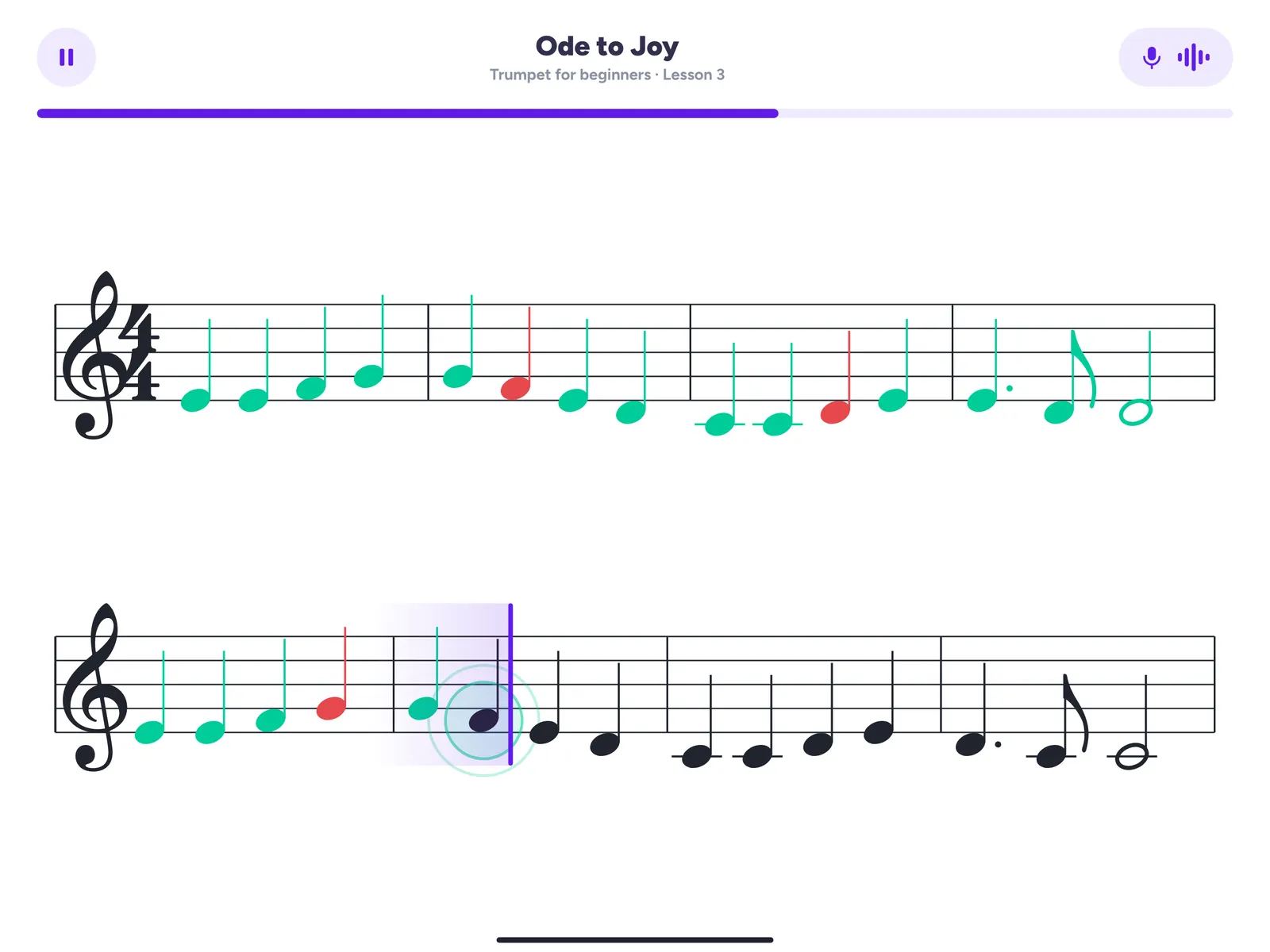
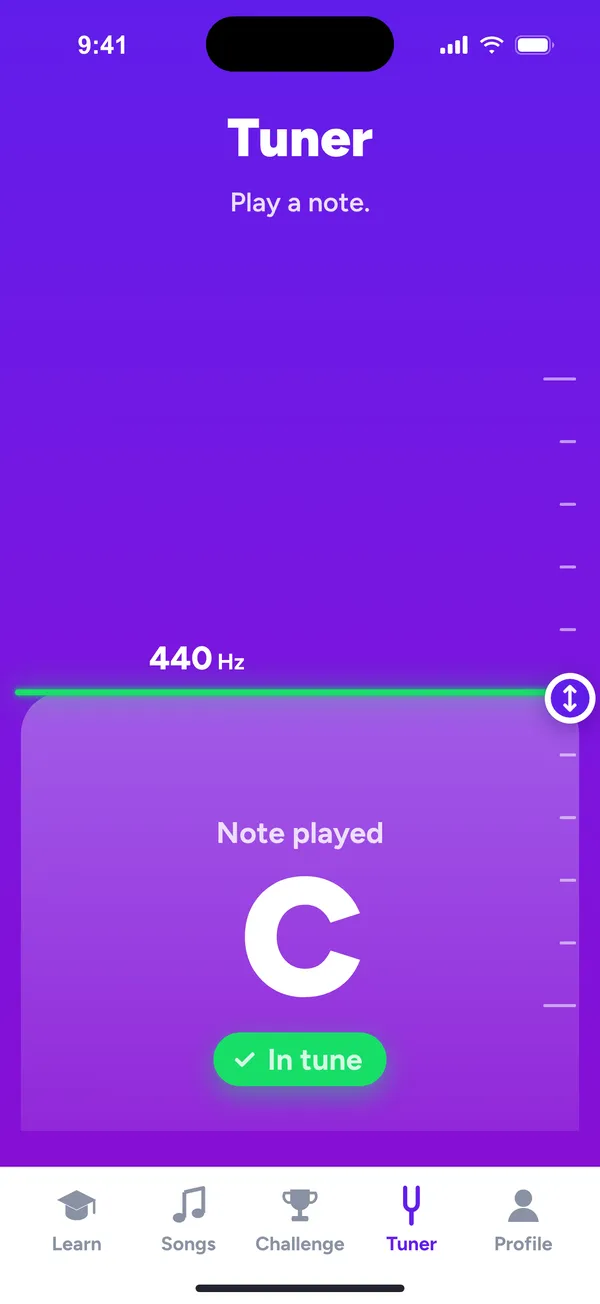
tonestro is the music school for every instrument, the trumpet included. You set your phone or iPad on the music stand and play, and you get feedback on pitch and rhythm as you go: right notes turn green, notes that were off turn red, and you see at a glance which bar to try again. Not sure which valves a note needs? The fingering charts in the app show you, and the built-in tuner helps you set your tuning slide before you start.
The courses for the B♭ trumpet are built by music teachers. In your first ten minutes you’re already playing one or two notes along with a real song and a band, and from there it grows lesson by lesson, with a large song library to play along with. tonestro hears you rather than sees you, so a mirror or a short video of yourself is the easy check for how the mouthpiece sits on your lips.
On the App Store, tonestro has been App of the Day and an Editors’ Choice, and on Google Play it has more than a million downloads. And if someone else at home plays the violin or the sax, one Family Plan covers up to six people and every instrument.
MakeMusic Cloud
Best for: working through a band method with recorded accompaniment.
MakeMusic Cloud, the platform formerly called SmartMusic, has a catalog with more than 200 method books, Essential Elements among them. As you play along, notes turn green, red or yellow for pitch, rhythm and duration, and you get a percentage score at the end. Recorded accompaniments put your part inside the whole band, and a tuner, a metronome and fingerings are built in. A free plan for individuals includes the green and red note feedback and part of the catalog, and the full catalog comes with the paid Classroom plans.
Metronaut
Best for: playing real pieces with an accompaniment that follows your tempo.
Metronaut puts sheet music, recorded accompaniments and feedback on your pitch and rhythm in one place, with the feedback shown right on the score. Its catalog of more than 20,000 titles runs from beginner to advanced. In Interpret mode the accompaniment follows your tempo, and in Sight-read mode the cursor waits until you play the right note. The free download lets you browse the catalog and preview pieces, and Premium unlocks the full library.
Play real pieces
Once you know a handful of notes, real pieces keep you coming back to the trumpet. Metronaut (above) fits here too.
Tomplay
Best for: pop, jazz and classical pieces with recordings of real musicians.
Tomplay has thousands of trumpet arrangements, from beginner to expert, with accompaniment recorded by professional musicians: the rest of the band for pop, rock and jazz, a piano part for many classical pieces. You can slow the tempo down. In Wait Mode the score moves on only when you play the right notes, and an on-screen trumpet shows where to find a note.
MuseScore
Best for: free sheet music from a huge community library.
MuseScore gives you free community scores in its app, and you can browse them by instrument, trumpet included. The player lets you set the tempo and loop a passage. Transposing into another key and keeping scores offline come with MuseScore PRO.
Learn from a pro’s videos
ArtistWorks
Best for: classical trumpet from an orchestra player, at your own pace.
At ArtistWorks, David Bilger, former principal trumpet of the Philadelphia Orchestra, shows his approach to classical technique, tone and artistry in more than 140 video lessons, from beginner to advanced. Next to them is a library of more than 950 video exchanges: students sent in videos of their playing, and he answered each one with a video of his own. You can preview sample lessons before you start a free trial. The focus is classical repertoire, so it suits you best if that’s the music you love.
When you’d like a person
Some things are easier to sort out with someone watching: how the mouthpiece sits, how hard you press, how you breathe. And half the fun of the trumpet is playing with others.
Online lessons. Preply connects you with trumpet tutors for one-to-one online lessons that start with a trial lesson, and you can switch tutors for free if the first one isn’t right. The MTNA teacher search below also shows teachers who teach online.
A teacher near you. In the US, the MTNA teacher search lets you filter for trumpet or brass, and the Royal Conservatory’s directory covers the US and Canada. In the UK, look at the ISM Music Directory or the Trinity Teacher Directory. In Australia, your state’s music teachers’ association keeps a list, for example MTASA, which you can search by instrument, MTA NSW or QMTA.
A band for adults. New Horizons bands are an entry point to making music for adults, from complete beginners to people who played in school long ago, across the US, Canada and beyond. In the UK, Brass Bands England lists hundreds of bands by region. Ask a band near you whether it runs a learner group.
Starting for free
- A free plan: MakeMusic Cloud’s free plan includes the green and red note feedback, and the first 50 lines of the Sound Innovations Book 1 band method are free to play there.
- Free sheet music: IMSLP has public-domain scores, among them Arban’s method for cornet and trumpet, first published in 1864. Check the copyright notice for your country before you download. MuseScore has free community scores in its app.
- Free from us: Our B♭ trumpet sheet music has free previews of 163 songs, with the fingerings each song needs. You can print our B♭ trumpet fingering chart and play along with three trumpet scales at your own tempo.
- Free trials: tonestro gives you 7 days free with the yearly plan, and Tomplay’s yearly plan starts with 14 free days. Metronaut, MakeMusic Cloud and ArtistWorks offer trials too, so check what each one includes.
How we put this guide together
In November 2026 we read each provider’s own store pages, website and help pages. We group the apps by how you learn, and nothing here is a ranking. Apps change quickly, so check the provider’s page before you subscribe.
Questions adults ask before they start
Can I really learn trumpet with an app as an adult?
Yes. An app gives you a plan and feedback at whatever hour you practice, which fits a busy week. Your sound and your stamina grow with short, regular sessions, and a lesson now and then is a good check on how you hold the trumpet and breathe. More on starting later in life: learning trumpet as an adult.
How long should I practice each day?
Short and often works best at the start, because the small muscles around your lips tire quickly. Rest when your lips feel tired, and stop if playing hurts. As your endurance grows, your sessions can grow too. Here’s what makes the first months easier than you think.
How soon can I play a song?
With tonestro, you play one or two notes along with a real song and a band in your first ten minutes. Playing a whole song on your own takes longer, and higher notes come over months, not days. Here’s a realistic trumpet timeline.
Can I teach myself trumpet?
Many adults do, especially with an app that shows when a note was off. Here’s how to teach yourself trumpet with a plan for your practice week, and if you’re starting from zero, your first week on the trumpet.
Your next step
Pick the route that sounds most like you, and try a beginner lesson in one or two apps before you choose a plan. If your route is “step by step, and show me when a note is off,” start with tonestro, and play your first song in ten minutes.