
On a violin, nothing shows you where a note is. There are no frets and no keys, and a finger that lands a few millimeters too high already sounds sharp. So the first question for any violin app is simple: will it tell you when a note is out of tune? If you want to practice on your own and know right away, pick an app that gives you feedback as you play. For the bow, video lessons and a teacher’s eye help most.
Three things a violin app should help with
Playing in tune. At first your ear needs help to catch a note that’s slightly off. An app with feedback shows you which notes were in tune.
Tuning. The G, D, A and E strings drift between sessions, and one string out of tune throws off the notes you play on it. A tuner built into the app saves you a step.
The bow. Your right arm makes the sound: how fast the bow moves, how much weight it carries, where it meets the string. Video lessons show a teacher’s bow arm up close, and a mirror or a short video of yourself shows yours.
The short version
| If you want to… | Look at |
|---|---|
| learn step by step with feedback as you play | tonestro, Trala |
| follow a video course and watch the bow up close | ArtistWorks, Violin Lab |
| play from sheet music, with playback or a recorded accompaniment | MuseScore, Tomplay |
| learn with a real teacher | online lessons or a teacher near you (see below) |
| start without paying | free sheet music, lessons and trials (see below) |
Step by step, with feedback as you play
These apps work from the sound of your violin and tell you whether a note was in tune and on time. In our view, that helps most when you practice on your own. tonestro comes first because it’s our app.
| App | Feedback on | Built-in tuner | Runs on |
|---|---|---|---|
| tonestro | pitch and rhythm | yes, you pick the string | iPhone, iPad and Android |
| Trala | pitch and rhythm | yes, it also teaches tuning by ear | iPhone, iPad and Android |
tonestro
Best for: adults who practice on their own and want to know right away whether a note was in tune.
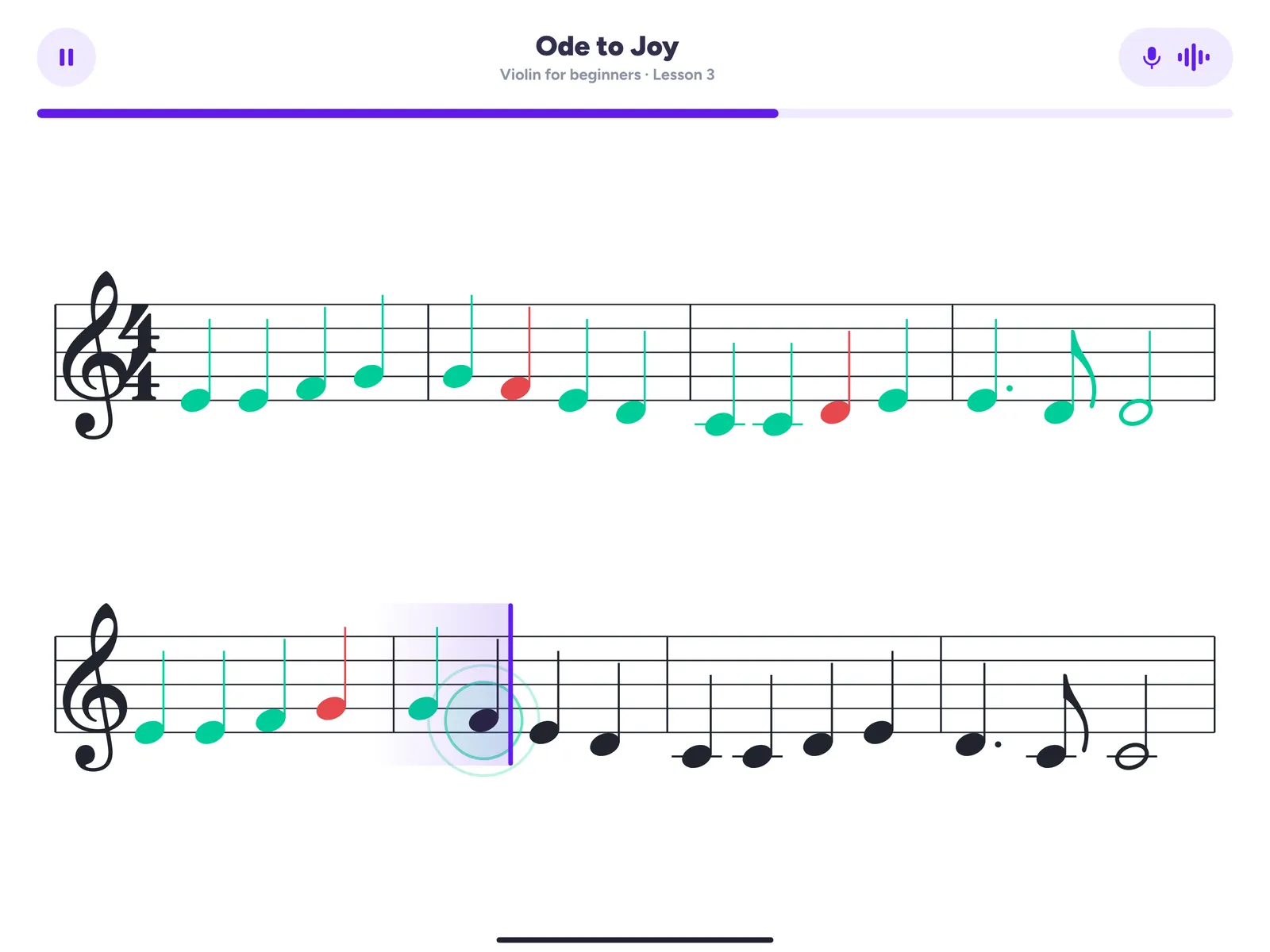
tonestro is the music school for every instrument. Set your phone or tablet on the music stand and play. Notes in tune and on time turn green, and notes that were off turn red, so you see which bar to try again. It works through the microphone, so there’s nothing to plug in.
The violin courses are built by music teachers and take you from your first notes to your first pieces. In your first ten minutes you’re already playing one or two notes along with a real song and a band. Reading music comes step by step, and until it does, you can show the note names. A fingering chart in the app shows where each finger goes.
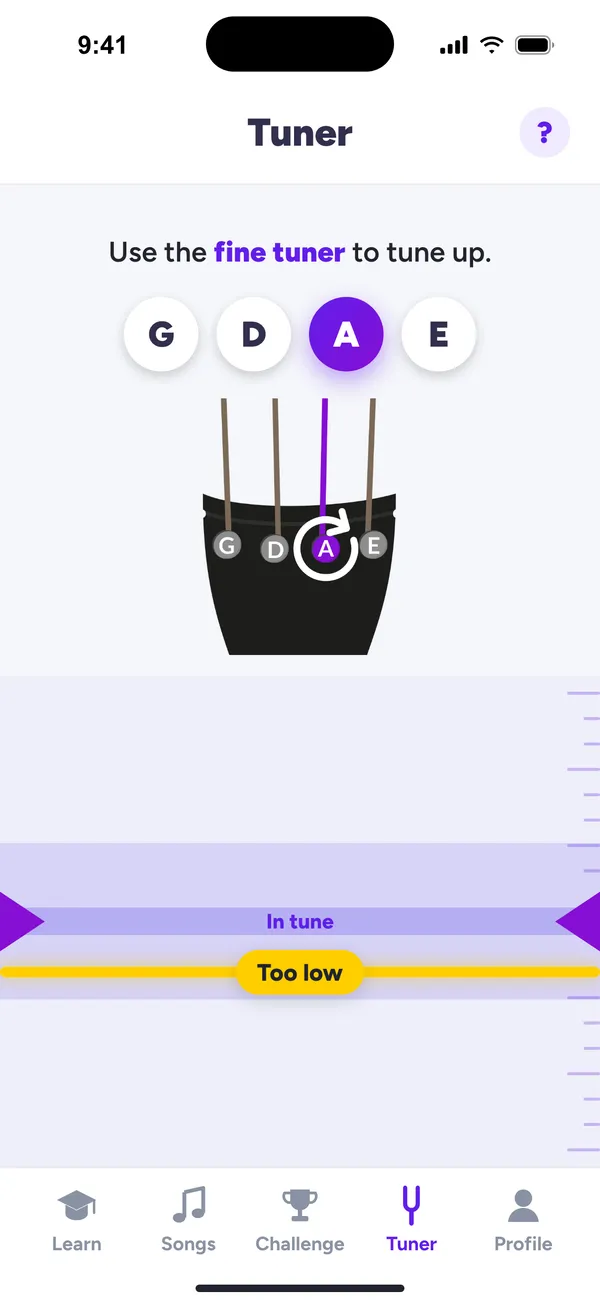
Start each session with the built-in tuner: pick the string, play it, and you see whether it’s in tune.
On the App Store, tonestro has been App of the Day and an Editors’ Choice, and on Google Play it has more than a million downloads. If others at home play too, one Family Plan covers up to six people and every instrument.
tonestro gives you feedback on the pitch and rhythm of your notes, not on your bow hold or posture. For those, a mirror or a short video of yourself is the quick check.
If you practice on your own and want to know right away whether you got it right, tonestro is our pick.
Trala
Best for: video lessons with well-known violinists, plus feedback as you play.
Trala is an app made for the violin. It analyzes the sound of your violin and gives instant feedback on pitch and rhythm. The curriculum runs from Bach to bluegrass, with videos featuring violinists such as Joshua Bell and Katie Jacoby of The Who, and more than 500 songs in its sheet music library. Its tuner also teaches you to tune by ear. Trala says its method is built for adult learners.
Watch the bow up close: video courses
A video course lets you watch a teacher’s bow arm as often as you like. Both courses below also let you learn from a teacher’s feedback on real playing.
ArtistWorks
Best for: learning one teacher’s way of playing, classical or fiddle.
At ArtistWorks, the classical violin school is run by Richard Amoroso, a violinist with the Philadelphia Orchestra for more than two decades. His lessons run in four levels, from fundamentals to advanced, and every student can watch more than 1,690 of his recorded video replies to students’ playing. For bluegrass and old-time, the fiddle schools of Darol Anger, Brittany Haas and Alex Hargreaves start with the basics and teach tunes phrase by phrase. At many schools, a Premium plan lets you send in your own video for feedback.
Violin Lab
Best for: a complete video course made for adults.
Violin Lab is an online course by violin teacher Beth Blackerby, designed for adult learners. It starts from zero, and a separate course teaches you to read music. Lessons come with sheet music and practice players with recorded accompaniment. With the Premium plan you send in a video and get personal feedback from Beth, and members can join live Zoom sessions.
Play along with sheet music
MuseScore
Best for: exploring free sheet music from the community.
MuseScore has free community scores in its app, and you can browse them by instrument, violin included. Playback, tempo control and looping help you learn a piece. Extra practice features come with a paid plan.
Tomplay
Best for: playing real pieces with a recorded accompaniment.
Tomplay pairs sheet music with recordings by professional musicians, so you play with a pianist, an orchestra or a second violin. Its violin pieces span every level from absolute beginner to expert. Pieces marked “Note Recognition” also have a Wait mode, which runs without the accompaniment: the cursor moves on only when you play the notes correctly. A tuner and a metronome are built in, and it works on phone, tablet and computer.
When you’d rather have a teacher
Some things are easier with a person watching: how you hold the bow, where your left thumb sits, why a tone keeps scratching. There are two routes.
Online lessons. Preply connects you with violin tutors for one-on-one lessons online. You start with a trial lesson, and if the first tutor isn’t a match, you can try two more for free.
A teacher near you. In the US, the MTNA teacher search lets you pick violin and look for online lessons too. The Royal Conservatory’s directory covers the US and Canada. In the UK, try the ISM Music Directory or the Trinity Teacher Directory. In Australia, the Australian Strings Association lists teachers by state and instrument.
Starting for free
- Free sheet music previews: Our violin sheet music pages give you an audio sample, the fingerings and the first lines of each song.
- Free to print: Our violin fingering chart shows the notes from G3 to B5 on one page, and IMSLP has public-domain scores. Check the copyright notice for your country before you download.
- Free lessons: Violin Lab offers free sample lessons and a drone and metronome tool.
- Free trials: tonestro gives you 7 days free with the yearly plan. Tomplay offers 14 days free with its yearly plan, and ArtistWorks 7 days for new students. For other apps, check what the trial includes.
How we put this guide together
In November 2026 we read each provider’s own store pages, websites and help centers and compared what they say about feedback while you play, help with tuning, devices, teaching approach and free ways to start. tonestro comes first in its group because it’s our app, and the others follow alphabetically. Nothing is ranked. Apps change quickly, so check the provider’s page before you subscribe.
Questions adults ask before they start
Can you learn the violin with an app as an adult?
Yes. An app gives you a plan and feedback on your notes, at whatever hour suits you. A mirror helps you check your posture, and a teacher can help you adjust your bow hold. More on learning the violin as an adult.
How do I know if I’m playing in tune?
At first your ear can’t always tell, and that’s normal. In tonestro, notes in tune turn green and notes that were off turn red, so your ears and eyes learn the difference together. Tune all four strings before you start, so the feedback is about your fingers, not your strings.
Can an app check my bow hold?
Your sound gives the first hint: a scratchy or uneven tone often means bow speed, weight or contact point need adjusting. The hold itself is easiest to check in a mirror, on a short video of yourself or with a teacher.
Do I need to read music first?
No. tonestro’s courses teach reading step by step, and you can show note names while you learn. Violin Lab teaches reading from scratch, and the ArtistWorks fiddle schools teach tunes by ear.
How long until I can play a song?
With tonestro, you play one or two notes along with a real song and a band in your first ten minutes. A whole song on your own, in tune and at full tempo, takes longer. Here’s a realistic violin timeline.
App or teacher: where should I start?
You don’t have to choose. An app covers daily practice with feedback, and a lesson every few weeks lets a teacher watch your bow and posture. Here’s how to teach yourself violin and how hard the violin really is for a beginner.
Your next step
Pick the route that sounds most like you, and try a first lesson before you commit to a plan. If yours is “step by step, and tell me when a note is off,” start with tonestro: tune with the built-in tuner, and in your first ten minutes you’ll play along with a real song and a band. More on our violin page.