
Your trombone is out of its case, the slide glides, and you want to finally play it. The slide has no markings, so every position is a spot your arm has to find and your ear has to check. The most useful thing an app can do is tell you, while you play, whether the note landed. Want a clear path with that kind of feedback? Choose a course app. Already play a little and want music for your evenings? Try a play-along library. And if you want a teacher to watch your embouchure, or a band to play in, we cover those too.
What matters on the trombone
The slide. Seven positions, none of them marked. A note that comes out a little sharp or flat often means the slide was a little off. Feedback on pitch catches that, and a slide position chart shows where a note sits.
Different notes in one position. In 1st position alone, your lips choose between Bb2, F3 and Bb3. Feedback on pitch tells you whether you hit the one you meant.
Clef and device. Trombone music is mostly in bass clef. If you learned treble clef in a brass band, look for an app that offers both. Some apps run on phones and tablets, others in a web browser.
The short version
| If you want… | Apps to look at |
|---|---|
| a guided course with feedback while you play | tonestro, or Zingo for band students |
| band music and method books with feedback | MakeMusic Cloud |
| sheet music with an accompaniment | Metronaut, Tomplay |
| free sheet music | MuseScore, IMSLP (see below) |
| a teacher or a band | online lessons, a teacher near you, a community band (see below) |
Apps that give feedback while you play
These apps show you right away which notes were right, so you can check your slide as you go: play, see the color, adjust.
| App | What it checks as you play | Runs on |
|---|---|---|
| tonestro | pitch and rhythm | iPhone, iPad and Android |
| MakeMusic Cloud | pitch, rhythm and duration | web browser on computers, Chromebooks, tablets and phones |
| Zingo | right and wrong notes | iPhone and iPad |
tonestro
Best for: adults who practice on their own and want to know right away whether a note was in tune.
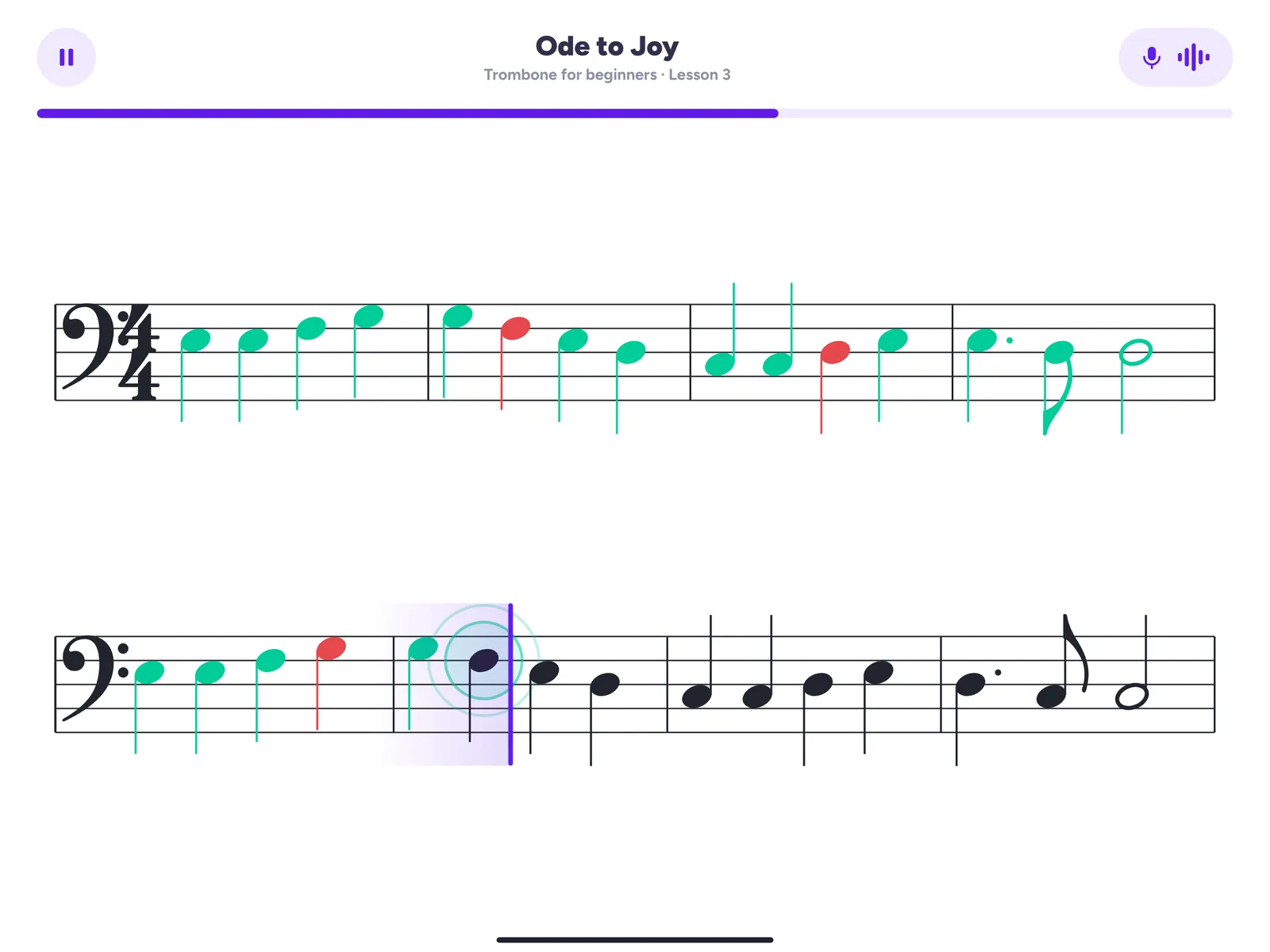
tonestro is the music school for every instrument, and the trombone has its own path. Put your phone or tablet on the music stand and play. Notes that were in tune and in time turn green, and notes that were off turn red. Missed one? Play it again and adjust the slide until the pitch is right.
The path has two courses, built by music teachers. In your first ten minutes you play one or two notes along with a real song and a band, and from there it grows lesson by lesson to your first songs. The music is in bass clef, and the slide position chart in the app shows where a note sits before you play it. A built-in tuner for your long tones, a slower practice tempo and a weekly challenge song round it out.
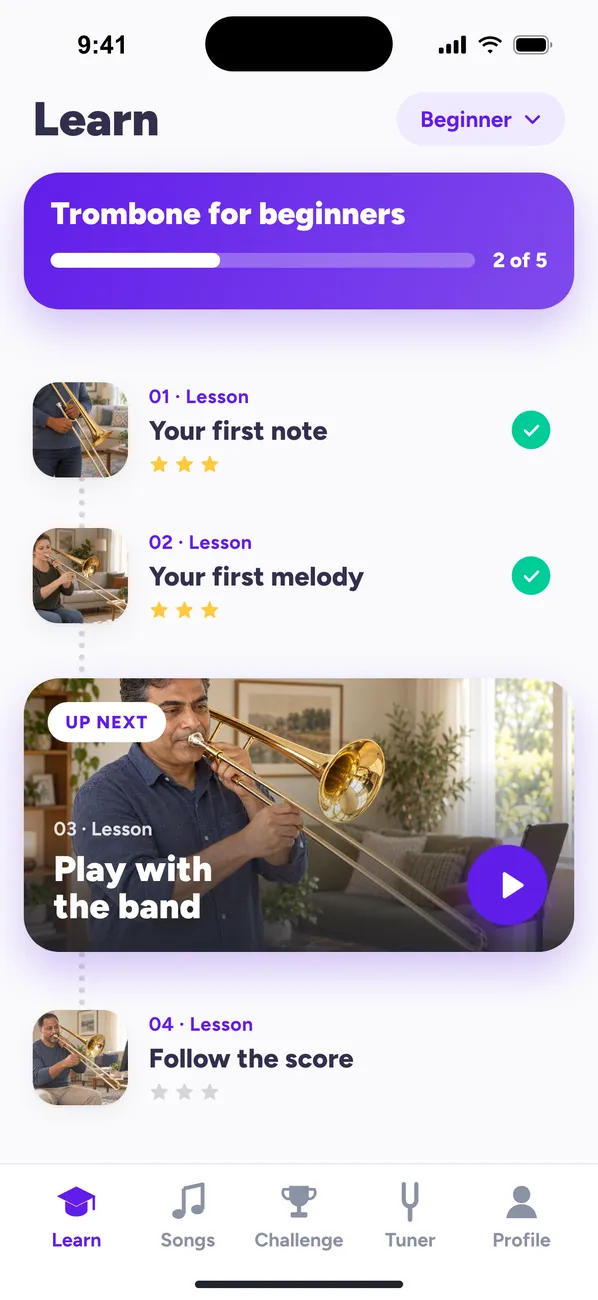
Why adults choose it: a guided start on the trombone you already own, at your own pace, with feedback on pitch and rhythm. If that’s what you’re after, tonestro is our pick. On the App Store, tonestro has been App of the Day and an Editors’ Choice, and it has over 1 million downloads on Google Play. One Family Plan covers up to six people and every instrument.
What it checks: the sound of your trombone. tonestro works through the microphone, not a camera, so for your embouchure and slide arm, a mirror or a short video of yourself is the quick check.
MakeMusic Cloud
Best for: practicing band music and method books, with a free plan to start.
MakeMusic Cloud grew out of SmartMusic and is made for music teachers and their classes. You play your part with a professionally recorded accompaniment while notes turn green, red or yellow for pitch, rhythm and duration. It shows the correct slide position for the notes in your part and has a metronome and loops. The catalog includes method books and trombone solos. Its free plan for individuals covers part of the catalog, with red and green notes, so check that the trombone music you want is in it. It’s a natural fit if your band or teacher already uses it.
Zingo
Best for: guided daily practice for band students, on iPhone and iPad.
Zingo, out since October 2026, is for trumpet, trombone, flute and clarinet. It plans each session for you, from the Warm-Up through technique exercises to songs. Play a scale or a song and it marks the correct notes in green, then shows which ones need more work. You also get videos of professional players, backing tracks, slide position help and nine levels. Its website speaks to band students and their directors.
Play along with sheet music
Know a few positions? These apps pair sheet music with an accompaniment, so you never play alone.
Metronaut
Best for: real pieces with an accompaniment that follows your tempo.
Metronaut has more than 20,000 pieces with professional accompaniments and lists the trombone among its instruments. It adapts the music to your clef and range and shows feedback on pitch and rhythm right on the score. In one mode the accompaniment follows your tempo as you shape a phrase. You can browse and play previews for free, on iPhone, iPad and Android.
MuseScore
Best for: free community sheet music.
MuseScore has free community scores for most instruments in its app, with playback, tempo control, loops and a note-by-note practice mode. A paid plan adds extras such as transposing, and separate video courses include the trombone. It runs on iPhone, iPad and Android.
Tomplay
Best for: playing along with professional recordings, in bass or treble clef.
Tomplay pairs sheet music with backing tracks recorded by professional musicians. Its trombone parts come in bass and treble clef, from absolute beginner to upper advanced, and you can slow a piece down, loop a section and record yourself. It works on phone, tablet and computer, and the yearly plan comes with a 14-day free trial, once per customer.
When you’d rather learn with people
Some things are easier with a person next to you: your embouchure, how you hold the slide, why a high note keeps cracking. And the trombone loves company.
Online lessons. Preply connects you with trombonists for one-to-one online lessons, starting with a 25- or 50-minute trial. If the first tutor isn’t a match, you can try two more for free. In Canada, Long & McQuade offers private and online trombone lessons, with evening and weekend times for adults.
A teacher near you. In the US, the MTNA teacher search lets you pick trombone, and the Royal Conservatory’s directory covers the US and Canada. In the UK, the Trinity Teacher Directory filters by instrument and location. In Australia, the MTA NSW teacher search and the VMTA directory in Victoria both let you search for trombone.
A band that welcomes beginners. New Horizons groups open music-making to adults, including those with no experience, across the US, Canada and beyond. In the UK, the Find a Band search of Brass Bands England lists bands by region, so you can ask the nearest one about a learner group.
Starting for free
- Free videos: pBone’s free trombone course with Liam Kirkman, former president of the British Trombone Society, covers holding the slide, breathing, buzzing and your first notes.
- Free sheet music: IMSLP has public-domain scores for trombone. Check the copyright notice for your country before you download. MuseScore has free community scores.
- Our pages: the trombone sheet music pages sort 155 songs by level, 51 of them easy, each with a free preview. The slide position chart shows all 31 notes from E2 to Bb4, free to print.
- Free plans and trials: MakeMusic Cloud has a free plan for individuals, and tonestro gives you 7 days free with the yearly plan.
How we put this guide together
tonestro is our app, built by music teachers, so here’s how we compared. In November 2026 we read each provider’s own store pages, website and help pages, looking at feedback while you play, devices, trombone content and free ways to start. tonestro comes first among the apps with feedback because it’s ours, and in every group the others follow alphabetically. Nothing here is ranked. Apps change quickly, so check the provider’s page before you subscribe.
Questions before you start
Can you learn the trombone with an app as an adult?
Yes. A good app gives you a plan and feedback while you practice, whenever it suits you, and a lesson now and then helps with embouchure and posture. More on starting later in life: learning trombone as an adult.
How does an app know if my slide position is right?
It goes by the pitch. When the slide stops a little short or too far out, the note comes out sharp or flat, and feedback on pitch marks it. In tonestro you look up the position, play, and see right away whether the note was in tune.
Do I need to read bass clef?
Not to start. tonestro’s courses teach you to read music while you play, in bass clef. If you read treble clef from a brass band, Tomplay offers trombone parts in both clefs.
Do I need headphones?
No, but they help once the band plays along. Without them, the microphone picks up the backing track too, and that can throw off the feedback. Wired headphones keep the band out of the room. tonestro works with the open sound of your instrument, so save a silent brass system for practice without the app.
How long until I can play a song?
With tonestro, you play one or two notes along with a real song and a band in your first ten minutes. A whole song on your own at full tempo takes longer. Here’s a realistic trombone timeline, and your first week step by step.
Your next step
Pick the route that sounds most like you, then try a first lesson in one or two apps before you choose a plan. If your route is “show me the way and tell me when a note is off,” start with tonestro. Your trombone is already out of its case.